

Micro Frontend 微前端
Created by 启维 on 8/3/2020 · Edited on 1/18/2021
最近(2020-07)实习中了解了部门 PaaS 微服务架构平台的 toB 大型管理类应用的前端是怎样集成的。网上找了找类似的架构和开发模式,发现这种前端叫 “微前端”,然后想做点笔记。主要内容来自于 Martin Fowler 的文章。
微前端是啥
网上看到很多文章是 2019 之后写的,但是了解到这个词最早在 2016 年提出,那个时候(或者更早些)已经有一些公司使用这种前端架构了。
前些年,微服务应用越来越多,但是微服务的关注点大部分时候落在后台部分,一些企业级应用的前台依旧是复杂的大型单体应用。这时候前台也想要吸收微服务设计和开发上的好处,各个业务团队不想全部使用同一种前端框架,有时候想要使用不同的、更适合团队和业务的前端技术,独立开发,独立构建,独立部署,独立测试,方便扩展,不想受限于平台的构建流程和已有的大量旧代码,而导致开发效率低或者产品质量受影响。这时候有了微前端。
Martin Fowler 对微前端的定义:“微前端是一种架构,使一个大型应用由多个可独立开发部署的前端应用组成。”
"An architectural style where independently deliverable frontend applications are composed into a greater whole"
微服务+单体前端:
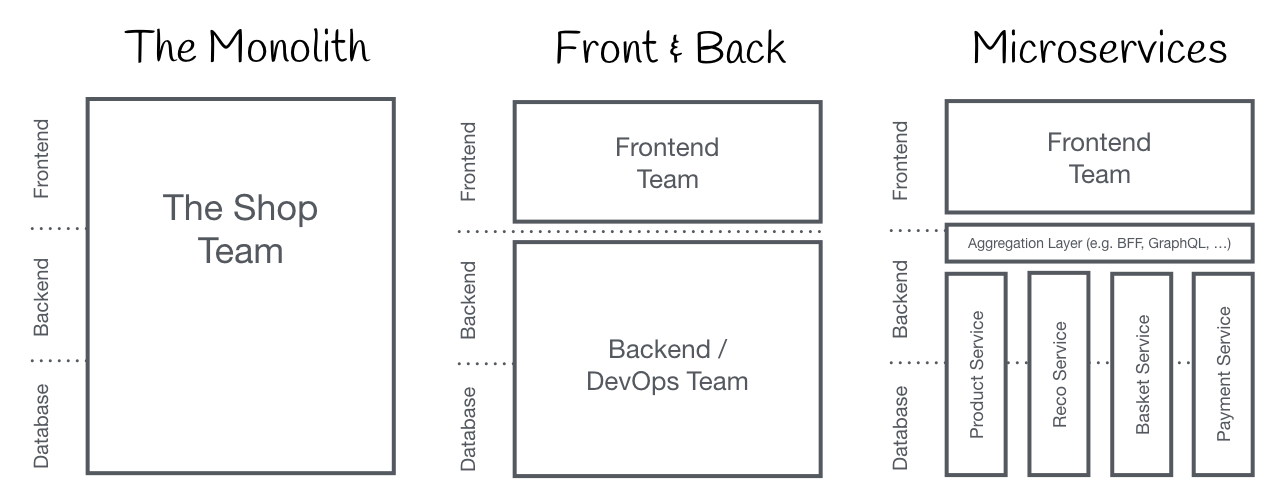
微前端:
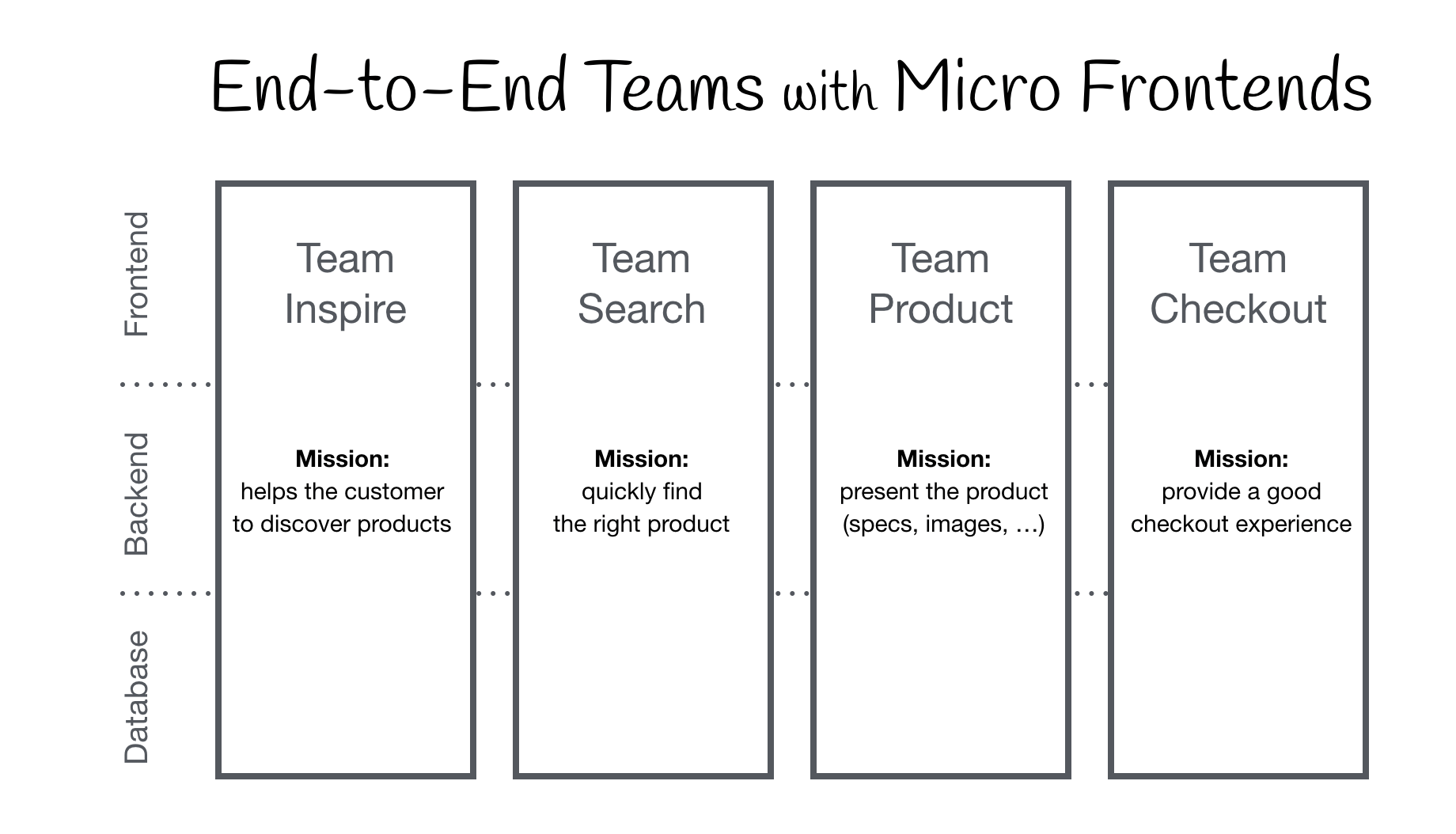
特点 / 优点
1. 粒度较小
- 业务级或更小的粒度,一个业务团队可以独立管理自己的业务代码,更容易维护,同时方便独立建立 CI/CD 流水线,独立部署。
- 而不是像单体应用是一个庞大的代码库。
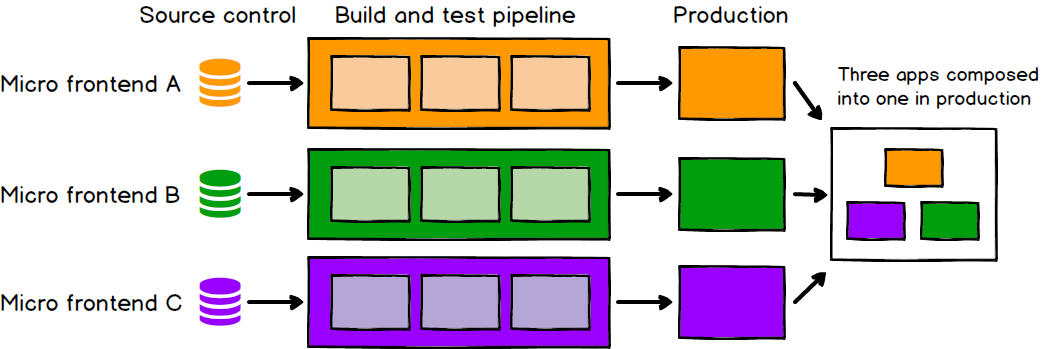
2. 解耦
- 业务之间低耦合,互不影响,方便升级,更新,重构/重写,尝试不同的技术。
- 业务内部功能高内聚,业务纵向分离,独立自治。
- 而不是像单体应用那样各个业务放在一起,大家用统一的技术栈,共用一个开发部署流程。
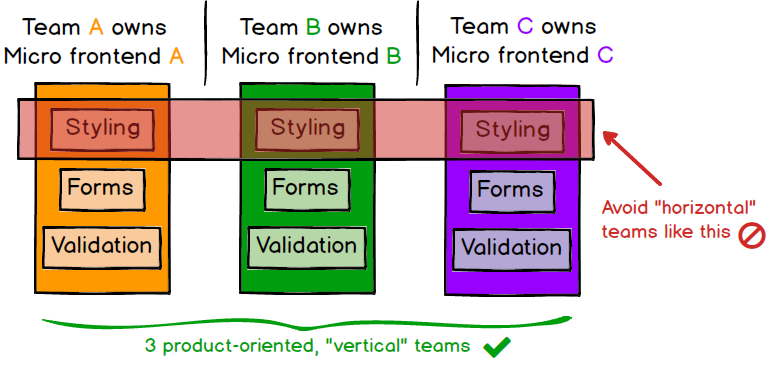
3. 扩展性强
- 以前两点为前提,微前端架构更容易增加新的业务或扩展已有的业务,方便多个把业务的旧代码慢慢转换成微前端。
感觉这些说的大概是一个东西,1 -> 2 -> 3。
集成
微服务部署后在各自独立进程上运行,而微前端部署后最终还需要集成,才能通过浏览器展现给用户。
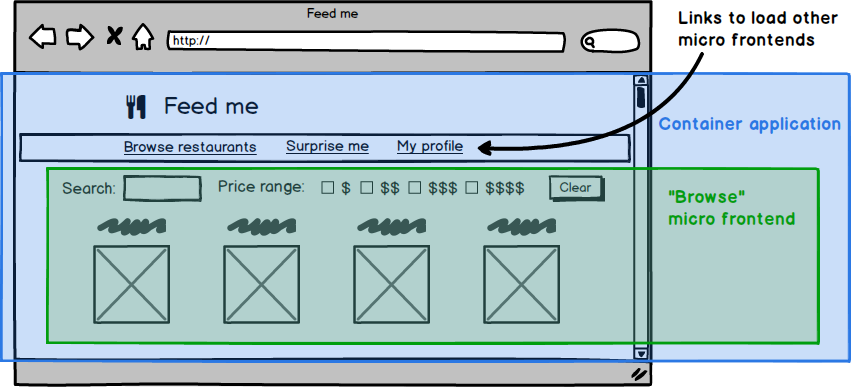
根据上面对微前端的宽松定义,有好几种微前端的集成方案,这里简单讨论下它们。这几种方案的相似之处是有一个主容器应用,主要负责:
- 渲染通用的界面组件比如 App Bar 和 Footer
- 解决所有页面都要用到的功能,比如用户认证和授权
- 决定哪个页面当前需要被渲染,比如各个菜单所对应的页面
1. 服务器端模版组合(⭑)
在服务器端使用模版生成 HTML 是比较老的方法了,比如 Express + ejs template 和 Flask + jinja2 template。
<!-- index.html -->
<html lang="en" dir="ltr">
  <head>
    <meta charset="utf-8">
    <title>Feed me</title>
  </head>
  <body>
    <h1>Feed me</h1>
    <!--# include file="$PAGE.html" -->
  </body>
</html>
这里 index.html 作为主容器,Page 变量会根据请求被替换成不同的业务模块/页面。我们用 Nginx Web 服务器写个简单的 demo:
server {
    listen 8080;
    server_name localhost;

    root /usr/share/nginx/html;
    index index.html;
    ssi on;

    # Redirect / to /browse
    rewrite ^/$ http://localhost:8080/browse redirect;

    # Decide which HTML fragment to insert based on the URL
    location /browse {
      set $PAGE 'browse';
    }
    location /order {
      set $PAGE 'order';
    }
    location /profile {
      set $PAGE 'profile';
    }

    # All locations should render through index.html
    error_page 404 /index.html;
}
这里省略了具体如何实现 HTML 模版的组合。假定 browse ,order,profile 由不同的业务组开发,并建立独立的流水线部署,如果做好隔离,不同页面间互不影响,根据上面的宽松定义,这种模式便可以被称作为微前端架构,这也说明微前端并不是很新的解决方案,过去可能已经有团队实现过。
2. 构建时集成(⭑⭑)
我们可以单独发布每个微前端,主容器应用把他们当做自己的依赖包:
// package.json
{
  "name": "@feed-me/container",
  "version": "1.0.0",
  "description": "A food delivery web app",
  "dependencies": {
    "@feed-me/browse-restaurants": "^1.2.3",
    "@feed-me/order-food": "^4.5.6",
    "@feed-me/user-profile": "^7.8.9"
  }
}
这样每个微前端的包很容易独立开发+部署发布,只用在构建时和主容器一起打包。这样做不好的地方是每次修改一个微前端都需要重新打包整个应用,包括它所有的依赖微前端,这种发布时的高耦合是我们不太想要的。
3. 运行时集成 via iframe(⭑⭑⭑)
iframe 应该是最简单的组合子页面的方法,iframe 还有天然隔离各个微前端 js 和 css 的特性,我们不用再考虑样式冲突和全局变量冲突的问题。
<html>
  <head>
    <title>Feed me!</title>
  </head>
  <body>
    <h1>Welcome to Feed me!</h1>

    <iframe id="micro-frontend-container"></iframe>

    <script type="text/javascript">
      const microFrontendsByRoute = {
        '/': 'https://browse.example.com/index.html',
        '/order-food': 'https://order.example.com/index.html',
        '/user-profile': 'https://profile.example.com/index.html',
      };

      const iframe = document.getElementById('micro-frontend-container');
      iframe.src = microFrontendsByRoute[window.location.pathname];
    </script>
  </body>
</html>
这也是一个比较老的解决方案,用 iframe 组成子页面很常见,只要设计好应用的业务结构便可以享受微前端的好处。
但是大家对 iframe 有一定抵触,虽然隔离更容易了,但是集成的灵活性上有所牺牲。 路由、历史和 deeplinking 变的更复杂,做好自适应也更加困难。可能这些“坑”让大家避免使用 iframe 包装微前端。
4. 运行时集成 via JS(⭑⭑⭑⭑)
这大概是最灵活,也是用的最多的一类微前端集成方案。
每个微前端通过 <script/> 标签被引入到主应用中,并提供一个全局接入函数作为它的入口,主容器选择什么时候该渲染哪个页面(微前端)。
<html>
  <head>
    <title>Feed me!</title>
  </head>
  <body>
    <h1>Welcome to Feed me!</h1>

    <!-- These scripts don't render anything immediately -->
    <!-- Instead they attach entry-point functions to `window` -->
    <script src="https://browse.example.com/bundle.js"></script>
    <script src="https://order.example.com/bundle.js"></script>
    <script src="https://profile.example.com/bundle.js"></script>

    <div id="micro-frontend-root"></div>

    <script type="text/javascript">
      // These global functions are attached to window by the above scripts
      const microFrontendsByRoute = {
        '/': window.renderBrowseRestaurants,
        '/order-food': window.renderOrderFood,
        '/user-profile': window.renderUserProfile,
      };
      const renderFunction = microFrontendsByRoute[window.location.pathname];

      // Having determined the entry-point function, we now call it,
      // giving it the ID of the element where it should render itself
      renderFunction('micro-frontend-root');
    </script>
  </body>
</html>
这段代码非常原始,但是很好地展示了运行时用 JS 集成微前端的方案。它和构建时集成的区别是可以单独部署每个微前端的 bundle。它和 iframe 的主要区别是在集成上有更大的灵活性,只要在需要时下载 bundle。
实习中的 PaaS 平台前端应用的集成方案应该属于这一大类。
5. 运行时集成 via Web Components(⭑⭑⭑⭑⭑)
上一个用 JS 集成的问题是 bundle 里面可能有 CSS、图片等静态资源,导致 bundle size 比较大,而且资源的并行加载等特性也无法利用上。
可以把上一段代码改成以 HTML custom element 的形式接入,不用在全局定义各个微前端的接入函数。
<html>
  <head>
    <title>Feed me!</title>
  </head>
  <body>
    <h1>Welcome to Feed me!</h1>

    <!-- These scripts don't render anything immediately -->
    <!-- Instead they each define a custom element type -->
    <script src="https://browse.example.com/bundle.js"></script>
    <script src="https://order.example.com/bundle.js"></script>
    <script src="https://profile.example.com/bundle.js"></script>

    <div id="micro-frontend-root"></div>

    <script type="text/javascript">
      // These element types are defined by the above scripts
      const webComponentsByRoute = {
        '/': 'micro-frontend-browse-restaurants',
        '/order-food': 'micro-frontend-order-food',
        '/user-profile': 'micro-frontend-user-profile',
      };
      const webComponentType = webComponentsByRoute[window.location.pathname];

      // Having determined the right web component custom element type,
      // we now create an instance of it and attach it to the document
      const root = document.getElementById('micro-frontend-root');
      const webComponent = document.createElement(webComponentType);
      root.appendChild(webComponent);
    </script>
  </body>
</html>
使用 Web Component 集成和 JS 集成很相似,这两种方案可以用同样的开发模式和打包部署方式,区别在于这里使用了浏览器提供的 custom element API,直接插入 HTML element。
难点
集成的难点主要有三个地方:CSS 隔离, JS 隔离,和通信。
CSS 本身是全局的,没有模块或者封装,比如一个微前端用了 h2 { color: black; },另一个团队的微前端用的是 h2 { color: blue; },那就会有 CSS 冲突,总有一个微前端的 h2 tag 会出现颜色问题。
这是个老问题了,之前我做 Chrome 插件的时候就遇到过类似的问题,我尝试过使用 iframe 解决,但是导致插件灵活性不够。又尝试了 Shadow DOM,属于 web component 的一种,可以保证样式隔离,但是在引入 Material-UI 或者 Ant-Design 组件时会出现了无法解决的问题,比如当使用 Material-UI 的 paper 时,<style> 或其他 HTML tag 只能插入到 <head> 或 <body> 中,但是 Shadow DOM 里面根本不知道外面的世界,所以放弃了 Shadow DOM,最终通过修改 Chrome 插件中的 className 命名来约束 CSS 选择器。
微前端的样式问题也可以通过团队间商量好 CSS 命名规则约定,然后结合使用 CSS 预处理器比如 SASS,其中 selector nesting 功能可以借用来当作 CSS namespace。这样的坏处是难以把已有的大型单体应用中的业务模块慢慢转化成微前端,因为它们比较难以进行大幅度修改。
CSS in JS 是一个比较好的解决方法,因为样式和它对应的组件绑在一起,修改一个组件的样式不会影响其他任何地方,如果删除这个微前端(比如界面上切换了菜单/页面),微前端的 CSS 和会跟着被删除,所以不用担心样式冲突了。
CSS 解决后,怎样确保微前端的 JS 全局变量不会出现冲突呢?常见方法有通过命名解决。qiankun(蚂蚁的微前端解决方案)中使用了 JS 沙盒解决这个问题,请参考这篇文章。
最后,微前端之间或者和主容器应用之间有时候需要通信,通常使用浏览器自带的 events 比如 click, select, mouseover 实现通信,如果有更多的需求可以使用 Custom event ,这样直接使用浏览器的 API 可以让微前端架构保持解耦。如果不使用浏览器的API,我们也可以写一个 JS 库实现全局的事件驱动式的通信管理功能,但会加入一定程度的耦合。
缺点
-
每个微前端单独打包会导致一些重复的依赖包,比如多个微前端使用了 React,那么每个包都有重复的 React,而且不方便把他们提取出来,因为每个微前端可能需要不同版本的依赖包。更大的 bundle size 导致用户需要下载的资源变大,对应用的性能和用户体验有不好的影响。
-
微服务和微前端都会无法避免的增加复杂度,有更多的代码仓库、工具、流水线和服务器需要管理。所以在选择微前端架构之前要考虑好有没有足够的自动化流程和基础设施支持,有没有扩展他们的能力,有没有保证各微前端质量和一致性方案。
实现
客户端框架:
-
qiankun: 蚂蚁金服的微前端解决方案
-
piral: Framework for next generation web apps using microfrontend
-
OpenComponents: OpenComponents, serverless in the front-end world for painless micro-frontends delivery
-
luigi: Micro frontend framework by SAP
-
fint: Modular JavaScript framework for building scalable and reactive applications
服务端框架:
-
PuzzleJs: Micro frontend framework for scalable and blazing fast websites
-
Podium: Easy server side composition of microfrontends
-
MicroMono: Write microservices in monolithic style
Helper Libraries:
-
single-spa: The router for easy microfrontends
-
Postal.js: JavaScript pub/sub library supporting advanced subscription features, and several helpful add-ons.
-
EventBus: Simple JavaScript class for managing events
美团的实现:
参考
https://martinfowler.com/articles/micro-frontends.html
https://developer.mozilla.org/en-US/docs/Web/Web_Components
https://mxstbr.com/thoughts/css-in-js
https://www.thoughtworks.com/radar/techniques/micro-frontends
https://zhuanlan.zhihu.com/p/78362028
https://medium.com/@lucamezzalira/micro-frontends-decisions-framework-ebcd22256513
https://blog.bitsrc.io/state-of-micro-frontends-9c0c604ed13a